<feed xmlns="http://www.w3.org/2005/Atom">
  <title><![CDATA[Julia Evans: TIL]]></title>
  <link href="http://jvns.ca/til/atom.xml" rel="self"/>
  <link href="http://jvns.ca/til"/>
  <updated>2026-02-02T00:00:00+00:00</updated>
  <id>http://jvns.ca/til/</id>
  <author>
      <name>Julia Evans</name>
  </author>
  <generator uri="http://gohugo.io/">Hugo</generator>

  
  <entry>
    <title type="html"><![CDATA[esbuild can build css]]></title>
    <link href="https://jvns.ca/til/esbuild-can-build-css/"/>
    <updated>2026-02-02T00:00:00+00:00</updated>
    <id>https://jvns.ca/til/esbuild-can-build-css/</id>
    <content type="html"><![CDATA[<p>I learned recently that CSS supports <a href="https://jvns.ca/til/css-supports-nested-selectors-now/">nested selectors</a>, but browser support still isn&rsquo;t 100%.</p>
<p>I found that <a href="https://esbuild.github.io/content-types/#css">esbuild can un-nest the selectors</a>, so I added this to my deployment
script so that my CSS works for more people. (I chose the &ldquo;chrome90&rdquo; target
extremely arbitrarily)</p>
<pre><code>find . -name '*.css'
     -exec esbuild {} --target=chrome90 --outfile={} \;
</code></pre>
<p>I like that it&rsquo;s still optional so that I don&rsquo;t have to run it in development,
and if esbuild stops existing, my site will still mostly work!</p>
]]></content>
  </entry>
  
  <entry>
    <title type="html"><![CDATA[Al Sweigart's Python books are available for free]]></title>
    <link href="https://jvns.ca/til/al-sweigart-s-python-books-are-available-for-free/"/>
    <updated>2026-01-21T00:00:00+00:00</updated>
    <id>https://jvns.ca/til/al-sweigart-s-python-books-are-available-for-free/</id>
    <content type="html"><![CDATA[<p>I saw someone online today saying they enjoyed
<a href="https://inventwithpython.com/pythongently/">Python Programming Exercises, Gently Explained</a>.</p>
<p>I went to the author&rsquo;s site and I saw that he makes all of his books
(Automate the Boring Stuff with Python and more) available for free at
<a href="https://inventwithpython.com/">https://inventwithpython.com/</a>. I&rsquo;d heard of his books many times before but I
didn&rsquo;t realize that he made them available on his site like that!</p>
<blockquote>
<p>I&rsquo;m Al Sweigart, and I write books to teach beginners to code. I put them
online for free because programming is too valuable and needs to be accessible
to all.</p>
</blockquote>
<p>I always think it&rsquo;s so cool when authors do that, another example is Mark Dominus&rsquo;s <a href="https://hop.perl.plover.com/book/#PDF">Higher Order Perl</a></p>
]]></content>
  </entry>
  
  <entry>
    <title type="html"><![CDATA[Resources for upgrading Django]]></title>
    <link href="https://jvns.ca/til/resources-for-upgrading-django/"/>
    <updated>2026-01-21T00:00:00+00:00</updated>
    <id>https://jvns.ca/til/resources-for-upgrading-django/</id>
    <content type="html"><![CDATA[<p>I <a href="https://social.jvns.ca/@b0rk/115929016469043717">asked for advice about upgrading Django on Mastodon yesterday</a>
and people shared a couple of links I want to remember for the next time I want
to upgrade. (a big part of the reason I started this TIL blog is that I have no system for saving bookmarks other than to publish them to this blog :))</p>
<ul>
<li>Adam Johnson&rsquo;s <a href="https://github.com/adamchainz/django-upgrade">django-upgrade</a> to automatically upgrade Django project code, as well as his <a href="https://adamj.eu/tech/2025/12/03/django-whats-new-6.0/">what&rsquo;s new in Django posts</a></li>
<li>Django&rsquo;s <a href="https://docs.djangoproject.com/en/6.0/releases/6.0/#backwards-incompatible-changes-in-6-0">official release notes</a>, specifically the section on backwards incompatible changes</li>
<li>Django&rsquo;s <a href="https://www.djangoproject.com/download/#supported-versions">list of LTS releases</a></li>
</ul>
]]></content>
  </entry>
  
  <entry>
    <title type="html"><![CDATA[You don't have to close <p> or <li> tags]]></title>
    <link href="https://jvns.ca/til/you-don-t-have-to-close--p--or--li--tags/"/>
    <updated>2026-01-09T00:00:00+00:00</updated>
    <id>https://jvns.ca/til/you-don-t-have-to-close--p--or--li--tags/</id>
    <content type="html"><![CDATA[<p>I was writing HTML by hand today and was reminded
that closing <code>&lt;p&gt;</code> and <code>&lt;li&gt;</code> tags is optional, which I learned about from this
blog post:
<a href="https://blog.novalistic.com/archives/2017/08/optional-end-tags-in-html/">You are not required to close your <code>&lt;p&gt;</code>, <code>&lt;li&gt;</code>, <code>&lt;img&gt;</code>, or <code>&lt;br&gt;</code> tags in HTML.</a></p>
<p>It feels so much easier to just write the <code>&lt;li&gt;</code> tag at the beginning (as if
it&rsquo;s a bullet point) without worrying about the <code>&lt;/li&gt;</code>.</p>
<p>My HTML linter doesn&rsquo;t like it, but my HTML linter doesn&rsquo;t like a lot of things
and often I think I should just turn it off.</p>
]]></content>
  </entry>
  
  <entry>
    <title type="html"><![CDATA[Advice for writing alt text]]></title>
    <link href="https://jvns.ca/til/advice-for-writing-alt-text/"/>
    <updated>2025-11-05T00:00:00+00:00</updated>
    <id>https://jvns.ca/til/advice-for-writing-alt-text/</id>
    <content type="html"><![CDATA[<p>I often think about how to write effective alt text because I&rsquo;ve been working on
getting better at writing alt text for the comics I post on Mastodon.
I just found this article I really enjoyed <a href="https://adrianroselli.com/2024/05/my-approach-to-alt-text.html">on writing alt text from Adrian Roselli</a></p>
<p>It has a lot of great links to other perspectives on alt text, and it closes
with:</p>
<blockquote>
<p>Writing alternative text is not a technical exercise (at least, not beyond
basic WCAG conformance); it is copywriting tailored to your audience and
constraints</p>
</blockquote>
]]></content>
  </entry>
  
  <entry>
    <title type="html"><![CDATA[fx: a jq replacement]]></title>
    <link href="https://jvns.ca/til/fx--a-jq-replacement/"/>
    <updated>2025-11-05T00:00:00+00:00</updated>
    <id>https://jvns.ca/til/fx--a-jq-replacement/</id>
    <content type="html"><![CDATA[<p>I&rsquo;ve always struggled to use jq and at this point I&rsquo;ve given up on ever learning
the jq language.
André Arko <a href="https://andre.arko.net/2025/06/13/fx.wtf/">posted about a new jq alternative</a>
called <code>fx</code>, which uses Javascript instead of its own language.
I already know Javascript, so maybe it&rsquo;ll be easier for me to use!</p>
<p>I haven&rsquo;t really adopted it yet but I like the idea, so I&rsquo;m putting it here
so that I can look it up when I inevitably forget &ldquo;hey, what was that new jq
alternative again?&rdquo;</p>
]]></content>
  </entry>
  
  <entry>
    <title type="html"><![CDATA[CSS supports nested selectors now!]]></title>
    <link href="https://jvns.ca/til/css-supports-nested-selectors-now/"/>
    <updated>2025-08-08T00:00:00+00:00</updated>
    <id>https://jvns.ca/til/css-supports-nested-selectors-now/</id>
    <content type="html"><![CDATA[<p>I just learned that CSS now supports nested selectors!  So I can write something
like this and it works without using a preprocessor like SCSS:</p>
<pre><code>.cal-link {
  right: -18px;
  top: -6px;
  @media (max-width: 800px) {
    right: 0;
    top: -4px;
  }
}
</code></pre>
<p>Here&rsquo;s the <a href="https://caniuse.com/css-nesting">caniuse page</a> for more on browser support.</p>
<p>MDN says there are some <a href="https://developer.mozilla.org/en-US/docs/Web/CSS/Nesting_selector#cannot_represent_pseudo-elements">limitations around using it with pseudo-elements  like ::before though</a>.</p>
]]></content>
  </entry>
  
  <entry>
    <title type="html"><![CDATA[You can use `fzf` to review git commits]]></title>
    <link href="https://jvns.ca/til/fzf-preview-git-commits/"/>
    <updated>2025-06-17T11:38:07+00:00</updated>
    <id>https://jvns.ca/til/fzf-preview-git-commits/</id>
    <content type="html"><![CDATA[<p><code>fzf</code> is a tool that you can use to select items from a list. I think it&rsquo;s most
popularly used to search your shell history (as a <code>Ctrl+R</code> replacement in bash).</p>
<p>I&rsquo;ve honestly still never found a use for <code>fzf</code> myself (other than <a href="https://github.com/junegunn/fzf.vim">fzf.vim</a> which is amazing) but I just learned that
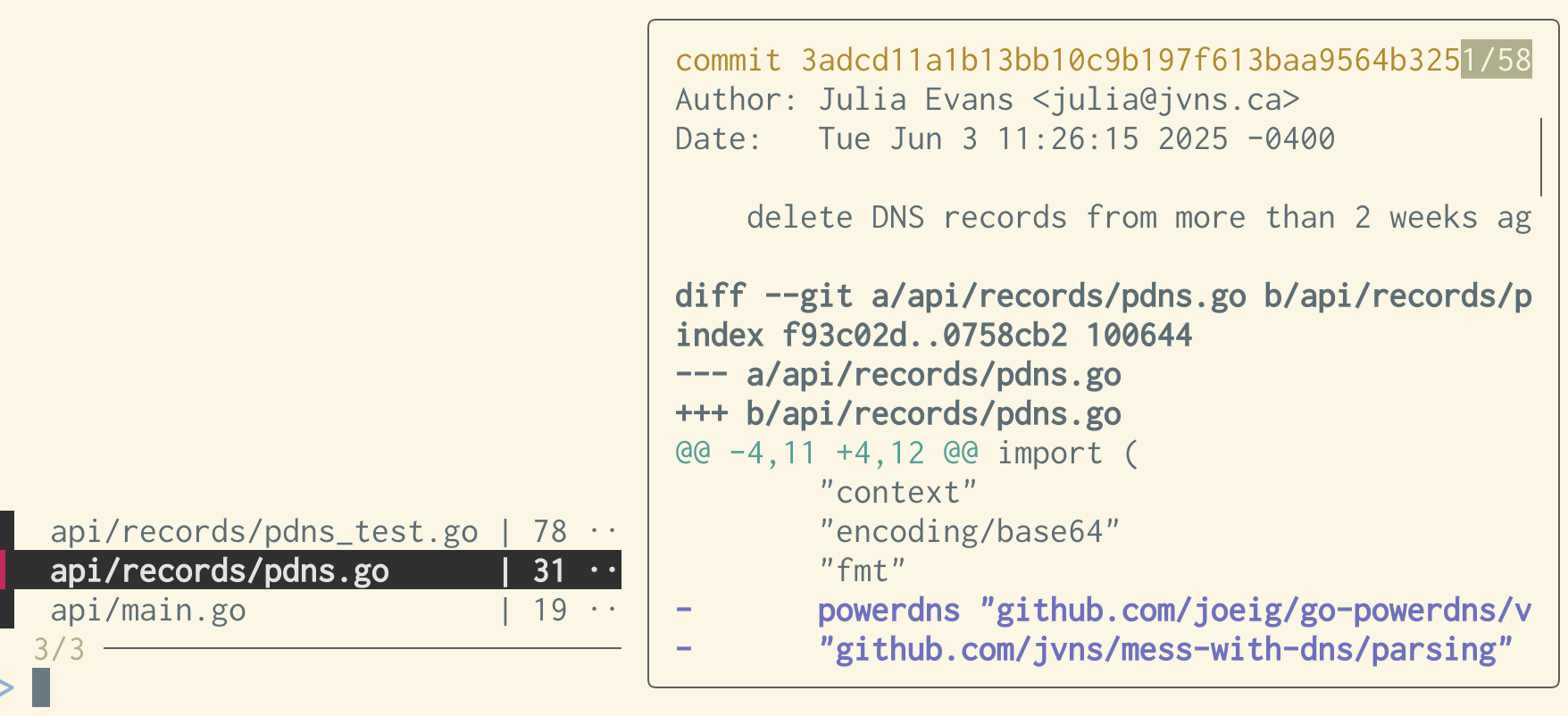
you can use it to review a git commit like this and I thought that was really
cool. You can scroll up and down through the files on the left and it&rsquo;ll
display the diff on the right:</p>
<pre><code>#!/bin/bash
commit=${1:-HEAD}
git show --stat=120 --format=&quot;&quot; &quot;$commit&quot; | \
           grep '|' | \
           fzf --ansi \
               --disabled \
               --bind 'j:down,k:up,q:abort' \
               --preview=&quot;echo {} | sed 's/ *|.*//' | xargs -I% git show --color=always $commit -- %&quot; \
               --preview-window=right:60%
</code></pre>
<img src="/images/fzf-git.png">
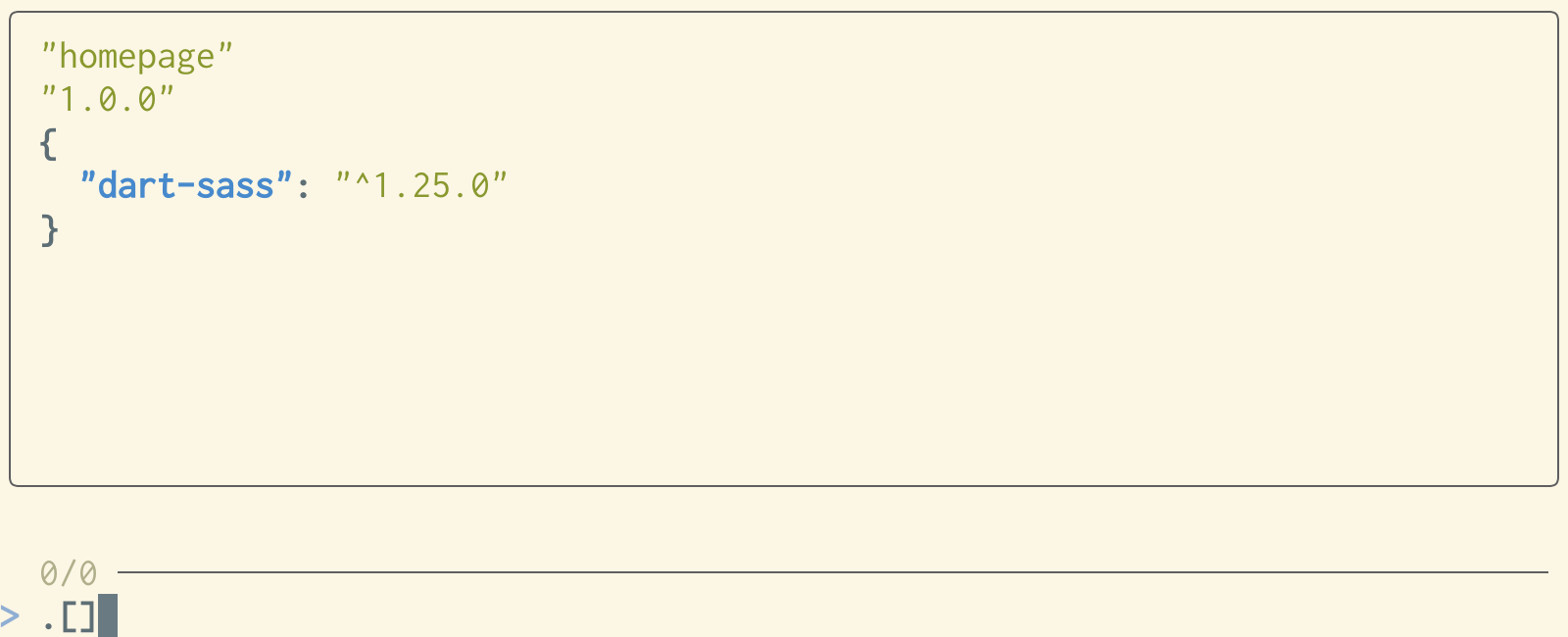
<p>You can also use <code>fzf</code> as a sort of &ldquo;jq playground&rdquo; like this:</p>
<pre><code>#!/bin/bash

printf '' | fzf --print-query \
  --preview &quot;jq -C {q} '$1' 2&gt;&amp;1&quot; \
  --preview-window=up:80%
</code></pre>
<img src="/images/fzf-jq.png">
<p>I think it&rsquo;s really cool that you can use fzf (which is theoretically a search
tool) to implement lots of UIs that aren&rsquo;t doing search at all, like these two!</p>
]]></content>
  </entry>
  
  <entry>
    <title type="html"><![CDATA[strace has a --stack-traces option]]></title>
    <link href="https://jvns.ca/til/strace-stack-traces/"/>
    <updated>2025-06-16T16:37:11+00:00</updated>
    <id>https://jvns.ca/til/strace-stack-traces/</id>
    <content type="html"><![CDATA[<p>I just learned that strace has a <code>--stack-traces</code> option from <a href="https://shane.ai/posts/backtraces-with-strace/">this nice blog post showing how you can use it to figure out what a Go program is doing</a>.</p>
<p><a href="https://rrampage.github.io/2025/06/13/strace-tips-for-better-debugging/">strace tips for better debugging</a>
also has some other strace tips I didn&rsquo;t know, like that you can use it to inject failures</p>
]]></content>
  </entry>
  
  <entry>
    <title type="html"><![CDATA[In CSS you can populate `content:` with a `data-` attribute]]></title>
    <link href="https://jvns.ca/til/in-css-you-can-populate--content---with-a--data---attribute/"/>
    <updated>2025-06-02T15:21:18+00:00</updated>
    <id>https://jvns.ca/til/in-css-you-can-populate--content---with-a--data---attribute/</id>
    <content type="html"><![CDATA[<p>I just learned how to implement a tooltip in pure CSS using <code>attr()</code> like this:</p>
<pre><code>&lt;style&gt;
&lt;span class=&quot;tooltip&quot; data-tooltip=&quot;this is a tooltip!&quot;&gt;Hover over me!&lt;/span&gt;
.tooltip:hover:after{
  content: attr(data-tooltip); /* &lt;-- this part! */
  background: #333;
  color: white;
  padding: 4px;
&lt;/style&gt;
</code></pre>
<p>Here&rsquo;s the preview:</p>
<style>
.tooltip:hover:after{
  content: attr(data-tooltip);
  position: absolute;
  background: #333;
  color: white;
  padding: 4px;
}
</style>
<p><span class="tooltip" data-tooltip="this is a tooltip"><strong>Hover over me!</strong></span></p>
<p>I wanted to keep this example small but In real life I&rsquo;d use <code>position:</code> and
<code>transform:</code> to move the tooltip somewhere else.</p>
]]></content>
  </entry>
  
  <entry>
    <title type="html"><![CDATA[Environment variables with no equals sign]]></title>
    <link href="https://jvns.ca/til/environment-variables-with-no-equals-sign/"/>
    <updated>2025-05-22T09:37:44+00:00</updated>
    <id>https://jvns.ca/til/environment-variables-with-no-equals-sign/</id>
    <content type="html"><![CDATA[<p>I learned a long time ago that environment variables are literally represented
as the string <code>NAME=value</code> (you can see this by running <code>cat /proc/self/environ</code> on Linux).</p>
<p>But what I never thought about until Kamal mentioned it to me yesterday was
that you can technically put <em>any</em> string in your environment, it doesn&rsquo;t have
to have an equals sign.</p>
<p>Here&rsquo;s a C program that does that and runs <code>env</code>:</p>
<pre><code>#include &lt;unistd.h&gt;
#include &lt;stdlib.h&gt;
#include &lt;stdio.h&gt;

int main() {
    char *weird_env[] = {
        &quot;NAME=value&quot;,
        &quot;banana&quot;,
        NULL
    };
   char *argv[] = {&quot;/usr/bin/env&quot;, NULL};
   execve(&quot;/usr/bin/env&quot;, argv, weird_env);
}
</code></pre>
<p>It prints out</p>
<pre><code>NAME=value
banana
</code></pre>
<p>I don&rsquo;t think this has any real practical implications. If you run a shell
like <code>bash</code> with this &ldquo;banana&rdquo; variable it&rsquo;ll just ignore it.</p>
]]></content>
  </entry>
  
  <entry>
    <title type="html"><![CDATA[Two ways the mouse wheel works in the terminal]]></title>
    <link href="https://jvns.ca/til/two-ways-the-mouse-wheel-works-in-the-terminal/"/>
    <updated>2025-04-25T13:33:07+00:00</updated>
    <id>https://jvns.ca/til/two-ways-the-mouse-wheel-works-in-the-terminal/</id>
    <content type="html"><![CDATA[<p>Learned today (thanks to <a href="https://www.chiark.greenend.org.uk/~sgtatham/">Simon Tatham</a>) that there are 2 different ways the mouse&rsquo;s scroll wheel can work in the terminal:</p>
<ol>
<li>if the application (like <code>less</code>) enables the alternate screen buffer, then scroll events are <code>ESC O A</code> or <code>ESC O B</code> (like pressing the up and down keys)</li>
<li>if mouse reporting is on, scroll events are reported to the program like other mouse events, as button press 4/5, with the coordinates of where your mouse was included</li>
</ol>
<p>(as well as the default where your terminal emulator will just scroll the terminal window without telling the program that you&rsquo;re scrolling)</p>
<p>This makes sense in retrospect because:</p>
<p>a) I&rsquo;ve noticed that some TUI programs (like lazygit) have multiple areas and you can scroll each area independently with the mouse, which &ldquo;feels&rsquo; like it would have to use mouse reporting&rdquo; (and it does)
a) it felt weird to me that <code>less</code> would support mouse reporting and indeed it doesn&rsquo;t</p>
<p>I don&rsquo;t think this is that useful in practice but it&rsquo;s kind of interesting that
sometimes the scroll wheel is just another way to press arrow keys really fast
and sometimes it acts more like a GUI scroll wheel.</p>
]]></content>
  </entry>
  
  <entry>
    <title type="html"><![CDATA[You can run `tty` to see your current TTY]]></title>
    <link href="https://jvns.ca/til/you-can-run--tty--to-see-your-current-tty/"/>
    <updated>2025-04-22T14:22:37+00:00</updated>
    <id>https://jvns.ca/til/you-can-run--tty--to-see-your-current-tty/</id>
    <content type="html"><![CDATA[<p>This is not a super useful fact but I thought it was cool and didn&rsquo;t know it
before: you can run <code>tty</code> to get the TTY device for your current terminal
session.</p>
<p>For example, if I run <code>tty</code> and get <code>/dev/pts/0</code>, I can then go to a
different terminal tab, run <code>echo blah &gt; /dev/pts/0</code>, and than <code>blah</code> will show
up in the original terminal tab.</p>
]]></content>
  </entry>
  
  <entry>
    <title type="html"><![CDATA[strace's `--tips`]]></title>
    <link href="https://jvns.ca/til/strace-s----tips-/"/>
    <updated>2025-04-22T09:54:48+00:00</updated>
    <id>https://jvns.ca/til/strace-s----tips-/</id>
    <content type="html"><![CDATA[<p>Two things I can&rsquo;t believe I didn&rsquo;t know earlier:</p>
<ol>
<li>strace&rsquo;s official logo is an <a href="https://strace.io/">adorable ostrich</a></li>
<li>If you pass <code>--tips</code> to strace, it&rsquo;ll give you an ASCII-art ostrich with a
speech bubble with an strace tip, like this: (via <a href="https://jade.fyi/">jade</a>)</li>
</ol>
<pre><code>  ______________________________________________         ____  
 | You can use -o|COMMAND to redirect strace's  |      |-. .-.|
 | output to COMMAND.  This may be useful       \      (_@)(_@)
 | in cases when there is a redirection          \     .---_  \
 | in place for the traced program.  Don't       _\   /..   \_/
 | forget to escape the pipe character, though, /     |__.-^ /
 | as it is usually interpreted by the shell.   |         }  | 
 \______________________________________________/        |   [ 
</code></pre>
]]></content>
  </entry>
  
  <entry>
    <title type="html"><![CDATA[Tiny IP-KVM devices exist]]></title>
    <link href="https://jvns.ca/til/tiny-ip-kvm-devices-exist/"/>
    <updated>2025-04-11T08:29:09+00:00</updated>
    <id>https://jvns.ca/til/tiny-ip-kvm-devices-exist/</id>
    <content type="html"><![CDATA[<p>I recently bought a server on Ebay and wanted to install Linux on it, but
didn&rsquo;t have a monitor! I discovered that today there are tiny cheap devices
that you can plug into the HDMI/USB ports that let me:</p>
<ul>
<li>go to <a href="http://192.168.1.xxx">http://192.168.1.xxx</a> to see the monitor output (and interact with it as if I had a keyboard plugged into the server)</li>
<li>store a bunch of ISOs on the device and pick which one I want to mount as a
USB drive</li>
</ul>
<p>I got this <a href="https://github.com/sipeed/NanoKVM?tab=readme-ov-file#where-to-buy">NanoKVM</a>
device on Aliexpress for $80 and it seems to do what it advertises!</p>
<p>The CPU is quite slow so <code>scp</code>ing ISOs to it seems limited by the CPU speed, I
can only scp at 5MB/s.</p>
]]></content>
  </entry>
  
  <entry>
    <title type="html"><![CDATA[Emoji Kitchen]]></title>
    <link href="https://jvns.ca/til/emoji-kitchen/"/>
    <updated>2025-03-07T13:18:31+00:00</updated>
    <id>https://jvns.ca/til/emoji-kitchen/</id>
    <content type="html"><![CDATA[<p>I just discovered <a href="https://emojikitchen.dev">https://emojikitchen.dev</a> by  <a href="https://bsky.app/profile/jenniferdaniel.bsky.social">Jennifer Daniel</a>
and it’s incredible, like this is hammer plus unicorn:</p>
<img src="https://jvns.ca/images/hammer-unicorn.png" width="200px">
<p>It has art for an incredible number of emoji combinations and it&rsquo;s built into Gboard on Android.</p>
]]></content>
  </entry>
  
  <entry>
    <title type="html"><![CDATA[pip install --user can override system libraries]]></title>
    <link href="https://jvns.ca/til/pip-install---user-can-override-system-libraries/"/>
    <updated>2025-02-03T12:57:57+00:00</updated>
    <id>https://jvns.ca/til/pip-install---user-can-override-system-libraries/</id>
    <content type="html"><![CDATA[<p>A few things I learned recently:</p>
<ul>
<li>Installing libraries with <code>pip install --user</code> on Debian will override the dependencies of system Python packages</li>
<li>But this isn&rsquo;t true with Homebrew or (I believe) Fedora</li>
</ul>
<p>(I wrote a <a href="https://gist.github.com/jvns/3f3da9a557bfff478f6f0145f1b6b52f">a quick gist</a> about my
explorations here but Python packaging is a complicated enough topic that I didn&rsquo;t
want to expand it into a whole blog post, it gave me a lot of appreciation for
the folks working on this)</p>
]]></content>
  </entry>
  
  <entry>
    <title type="html"><![CDATA[why the text disappers from my PDF when I print it]]></title>
    <link href="https://jvns.ca/til/why-the-text-disappers-from-my-pdf-when-i-print-it/"/>
    <updated>2025-01-31T11:04:49+00:00</updated>
    <id>https://jvns.ca/til/why-the-text-disappers-from-my-pdf-when-i-print-it/</id>
    <content type="html"><![CDATA[<p>A while back I ran into an issue where I made a PDF with some text in it, and I
could see the text in my PDF viewer, but when I printed it, it disappeared.
Eventually I figured out that converting the font to a TTF stopped the problem,
but I had no idea WHY that fixed it.</p>
<p>When I found the workaround I posted something like &ldquo;PDFs are weird&rdquo; on
Mastodon and shockingly someone replied with this incredible deep dive by Leah Neukirchen that explains exactly why this problem happened (even though I didn&rsquo;t mention ANY specifics about my problem at all):
<a href="https://leahneukirchen.org/blog/archive/2022/10/50-blank-pages-or-black-box-debugging-of-pdf-rendering-in-printers.html">50 blank pages, or: black-box debugging of PDF rendering in printers</a></p>
]]></content>
  </entry>
  
  <entry>
    <title type="html"><![CDATA[`**` works for globbing in the shell]]></title>
    <link href="https://jvns.ca/til/star-star-works-for-globbing-in-the-shell/"/>
    <updated>2024-12-13T12:08:26+00:00</updated>
    <id>https://jvns.ca/til/star-star-works-for-globbing-in-the-shell/</id>
    <content type="html"><![CDATA[<p>I just learned that globbing in fish is WAY more powerful than I realized, like:</p>
<ul>
<li>instead of <code>find . -name '*.md'</code> I can just do <code>ls **.md</code></li>
<li>instead of <code>find . -type d -name ‘*blah*’</code>, I can just <code>ls -d **blah*/</code></li>
</ul>
<p>A couple of notes:</p>
<ul>
<li>apparently you can do this in zsh or bash (with <a href="https://www.linuxjournal.com/content/bash-extended-globbing">bash&rsquo;s extended globbing</a>) too, though it might be <code>**/*.md</code> instead of <code>**.md</code></li>
<li>as usual globs don&rsquo;t include dotfiles so it&rsquo;s not exactly the same as running <code>find</code></li>
</ul>
<p>Learned this from <a href="https://adamspiers.org/computing/shells/">this page from 2004 on shells</a> which mentioned offhand that
&ldquo;under zsh, [globbing] is so powerful, it almost makes find redundant.&rdquo;</p>
]]></content>
  </entry>
  
  <entry>
    <title type="html"><![CDATA[Some programming languages buffer stdout and some don't]]></title>
    <link href="https://jvns.ca/til/programming-languages-buffer-stdout/"/>
    <updated>2024-11-27T13:16:13+00:00</updated>
    <id>https://jvns.ca/til/programming-languages-buffer-stdout/</id>
    <content type="html"><![CDATA[<p>Today I did some buffering tests in 10 languages where I wrote the equivalent of this
program and then ran the program with <code>./program | grep hello</code></p>
<pre><code>while True:
    print(&quot;hello&quot;)
    sleep(1)
</code></pre>
<ul>
<li>In 4 of the languages (Python, Ruby, C, Perl) nothing at at all gets printed (because they buffer the output when stdout isn&rsquo;t a TTY, the buffer size is probably 4k or something)</li>
<li>in the others (Go, C++, JS, Rust, Java, Lua, bash) you see &ldquo;hello&rdquo; printed out once per second. PHP is in this category too.</li>
</ul>
<p>I knew there was some variation here I didn&rsquo;t have a list of which languages did which and now I do. (If you want to not buffer the output you can flush stdout)</p>
<p><a href="https://github.com/jvns/buffer-stdout-tests">Here&rsquo;s the code I ran to test this</a></p>
]]></content>
  </entry>
  
</feed>